
Installer contract
npx website-build-skill copies the canonical files, verifies them by read-back and writes a
receipt of exactly what it wrote. Open the chosen host and ask it to read the installed entrypoint.
See compatibility for host setup evidence and loading checks.
TEAM: one command installs the seven workers' files; you open each session yourself and carry the handoffs between them. Researcher goes first.
Manual copy
Copy the complete skills/website-build-skill/ directory into a new, empty destination:
| Target | Project destination | Loading step |
|---|---|---|
| Claude Code | .claude/skills/website-build-skill/ |
Read back the entrypoint and assets |
| Codex | .agents/skills/website-build-skill/ |
Inspect discovery and invocation |
| Hermes | .agents/skills/website-build-skill/ |
Check trust and shared discovery |
| Gemini (via Antigravity CLI) | .website-build-skill/ |
Ask the session to read the entrypoint |
| Generic agent | .website-build-skill/ |
Read the entrypoint and preserve existing routers |
| Grok file-capable host | .grok/skills/website-build-skill/ |
Read back the entrypoint, or paste the bundles |
Do not merge into a conflicting directory. Compare and preserve existing files first. Copy a router pointer into existing project instructions only with authorization; do not replace them. Confirm the host can read the copied entrypoint and assets before beginning. For chat-only hosts, attach the five bundles and use the Project instructions.
Command interface
Install from npm:
npx website-build-skill --solo --target codex --dir . --scope project --yes
npx website-build-skill --team --target antigravity --dir . --scope project --yes
This recorded install uses the published 0.1.13 package (SOLO, Codex target), ending on the receipt read-back of 57 files.
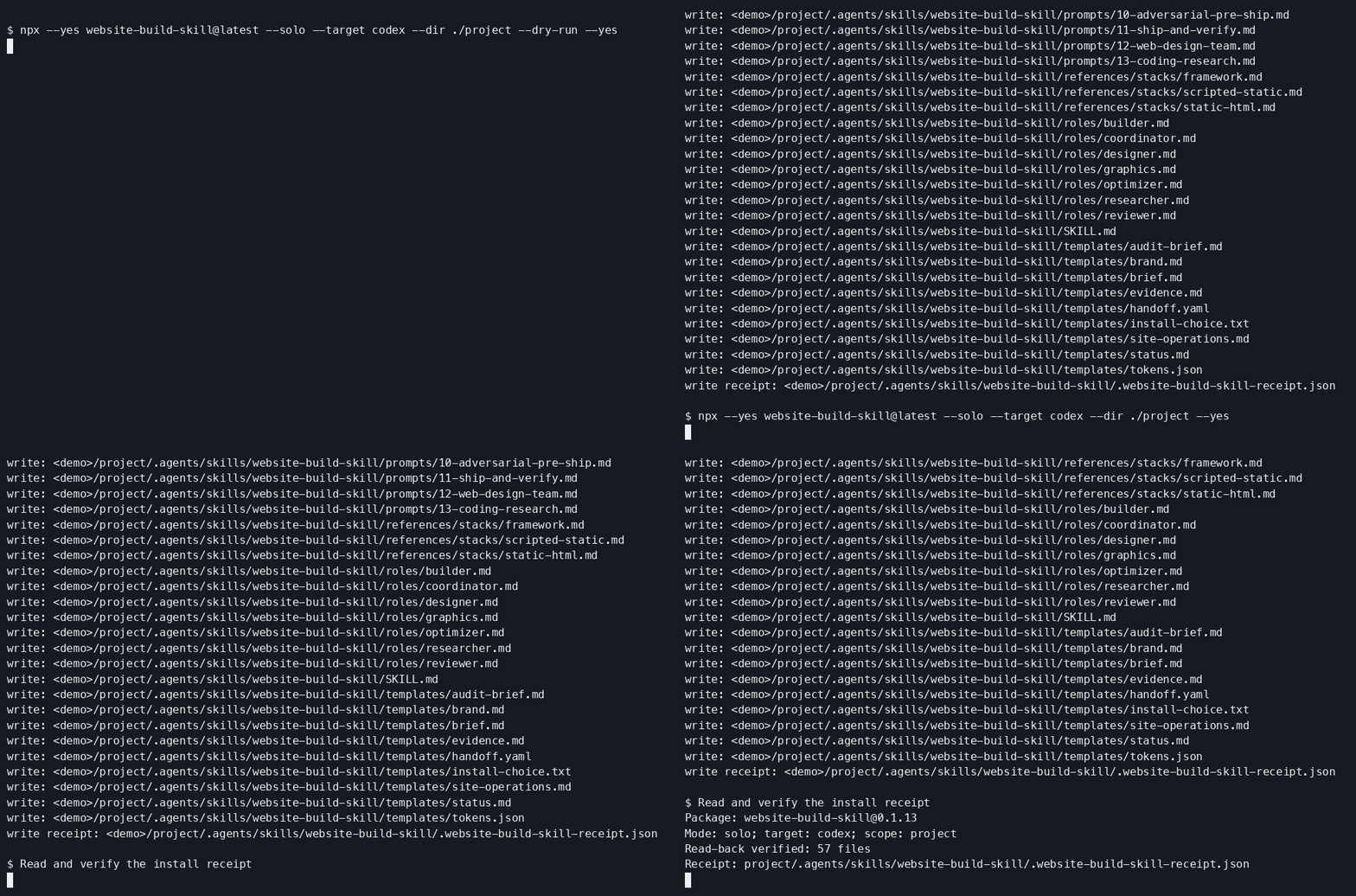
For unreleased changes, use npx github:aunysillyme/website-build-skill with the same flags.
Append #<reviewed-commit-sha> to the repository reference for a reproducible install.
- Choice: mutually exclusive
--solo/--team; no arguments asks the canonical human question first. - Target:
claude-code,codex,hermes,antigravity,grok,agents,chatgpt,portable. - Scope: project by default; user scope requires explicit selection, never implicit fallback.
- Destination:
--diris explicit;--bundle-diris accepted only for the Hermes team alias and resolves relative to the installed skill folder. Paths outside that folder are refused with exit 3 and "Path escapes destination root". - Output root:
--output-dirselects an existing directory separately from the skill destination. Interactive setup collects the save-location choice and path; Enter on the local-folder path uses the website project directory. The receipt recordsoutputRootand optionaloutputStorage(kind and Notion export target). Researcher consumes those values before writing<outputRoot>/site-work/research/library/scope.md. The installer only probes the root; it does not create a library or export to Notion. Headless setup without--output-dirleaves the root unset for Researcher to ask before writing. - Notion: export destination only. Interactive setup requires both the existing local working directory (authoritative) and a page URL or name for later export. No credentials are requested and no network upload occurs.
- Writability: confirm the output root by writing and reading back before any sweep; an unwritable root fails without partial writes.
- Headless:
--yesrequires mode, target and destination; EOF and missing arguments fail without writes. - Preflight: validate the entire intended output set before writes; reject symlinks, traversal and conflicts.
- Paths: the project root you name is canonicalized, so a symlinked ancestor such as macOS
/tmpinstalls normally. Every segment at or below that root is refused when it is a symlink, because that is what a third party can plant in an install target. - Idempotence: identical bytes are a no-op; changed bytes produce a reviewable diff without overwriting.
- Dry run:
--dry-runmakes no writes, including directories, receipts or aliases. - Runtime: offline after package retrieval; no telemetry, profiles, background tasks or lifecycle hooks.
- Receipt: list every actual path and digest, mode, target, definition and unresolved activation check.
- Integration: preserve existing routers and emit a named integration snippet; unmerged means activation pending.
- Interruption: record truthful partial results; never advertise an all-or-nothing transaction without evidence.
- Exit policy: 0 complete, 2 invalid input, 3 preflight conflict, 4 interrupted write, 5 activation pending. 5 is a completed install whose integration snippet is unmerged, not a failure.
- Uninstall: receipt-based, removing only files this package actually wrote and whose bytes still match the receipt. A file that was already on disk before the install, and therefore recorded as identical, is kept: installing it was a no-op and removing it would be taking something that is not ours. A changed file is kept and named, and so is a file the receipt does not list. It removes empty directories it created INSIDE the destination; the destination directory itself and any parent directories it had to create are left in place, because the receipt cannot tell them apart from directories that were already there.
- Destination: decided by
--targetand--dir, or by where the receipt sits when only--receiptis given. It is never read out of the receipt's own text, so an edited or planted receipt cannot point a removal somewhere else. - Read-back: every file is re-read from disk and digested after the write pass. A digest taken from the bytes the installer meant to write is a record of the intention, not of what is on disk, and the receipt only ever carries the second one.
- Ownership across runs: a reinstall that writes fewer files keeps owning what an earlier run wrote, so a SOLO install over a TEAM install does not orphan the bundles.
TEAM sessions and handoffs
The command copies the complete role files and five bundles. Open each worker's session yourself and supply its complete role body, readable resources and current handoff. Start Researcher first; carry its passing receipt and library to Coordinator before passing assignments to later workers. Record seven setup acknowledgements and use a different-family Reviewer. Enforce read-only review through host controls or a read-only packet. The Hermes alias copies bundles into the explicitly selected directory inside the skill folder. Session references and permissions require your own checks in the chosen host. See Gemini (via Antigravity CLI), Hermes and team ownership.
Verify the installation
Run the local checks with npm run check and npm test. The installer tests cover traversal
and symlink refusal, whole-set conflict refusal, idempotent reruns, dry-run behavior, output-root
writability, receipt digests, changed-file preservation during uninstall and router integration.
After installing, compare the receipt with files on disk and follow your adapter's loading check.
Record client-trial evidence in compatibility.